A free family calendar for the iPad you already own
FamPad turns an iPad into a wall calendar the whole family can read at a glance. Parents add and change events from their phones, and the iPad keeps the week on display. It is free to use, with no ads.
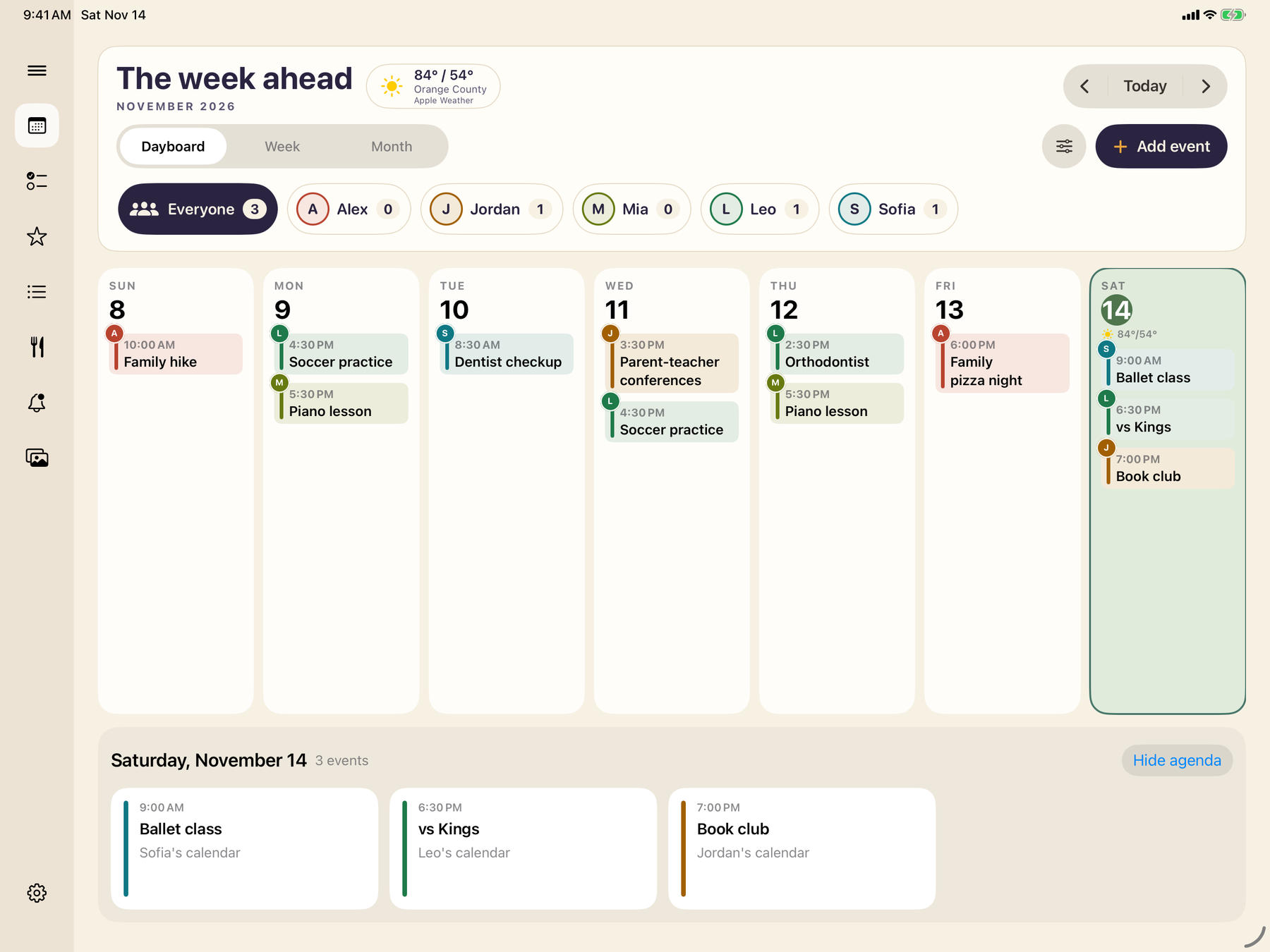
What the iPad shows
- Today's plan as a day board, plus week and month views
- Each person in their own colour, with a filter for one person or everyone
- The weather from Apple Weather, which you can switch off
- Today's game or match as a Game day card when you add a team schedule
The iPad stays on as a display. When it is quiet it can turn into a photo frame, so the wall is useful all day. See the family photo frame guide.
Getting events onto the calendar
Add an event on the wall iPad or from a parent's phone, and every paired device updates. You do not need to retype the calendars you already keep.
- Google Calendar syncs both ways, so an event added on the wall lands in that person's Google Calendar.
- iPhone calendars (iCloud, Google, Outlook, school) can be picked on the iPhone app with one tap and no password. They are view-only on the wall.
- Calendar links can be pasted in, which suits school and club calendars. For a team, turn on the sports team schedule.
If the schedule comes as a photo or an email, see how to turn a school schedule into calendar events.
Set it up in a few minutes
- Install FamPad on the iPad from the App Store. It needs iPadOS 18 or later.
- Create your household and add the family members.
- Install the iPhone app on a parent's phone, or use the website, and invite your partner.
- Prop or mount the iPad where the family passes it. The iPad wall setup guide covers mounting, charging and keeping the screen on.
More than a calendar
The same iPad also runs chores with stars and rewards, a shared grocery list that updates live, a weekly meal plan and picture routines for children who cannot read yet.
What it does not do yet
- The full wall display, including the photo frame, needs the iPad app. Older iPads and Android tablets run FamPad in a browser and show the calendar, chores and lists.
- There is no native Android app.
- Calendars picked from the iPhone are view-only. Edit those events in the app they come from.
If you are comparing options, see FamPad as a Skylight alternative.
Frequently asked questions
Is the FamPad family calendar free?
Yes. FamPad is free to use, with no ads, and it runs on an iPad you already own.
Do I need a special device?
No. Any iPad on iPadOS 18 or later runs the app. Parents use the iPhone app or the website.
Does it work with Google Calendar and iCloud?
Google Calendar syncs both ways. On an iPhone you can pick calendars already on the phone, such as iCloud, Google, Outlook and school calendars, and they show on the wall as view-only.
Does it work on an older iPad?
An iPad that cannot run iPadOS 18 can use FamPad in Safari and shows the calendar, chores and lists. The photo frame and the Right Now routines need the iPad app.
Can the whole family add events?
Parents add and edit events from the iPad or their phones. Everyone in the household sees the same calendar on the wall.
Get the iOS app or start on the web.
Not ready to sign up? Look around the live demo, no account needed.